
Avalanche risk layer
Turning it on
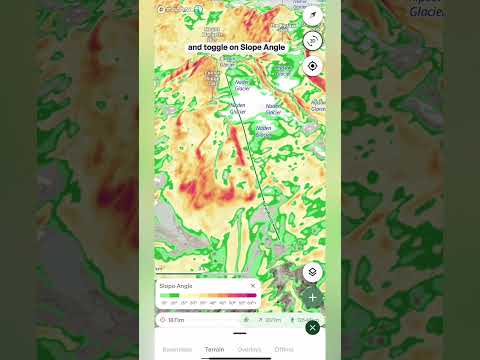
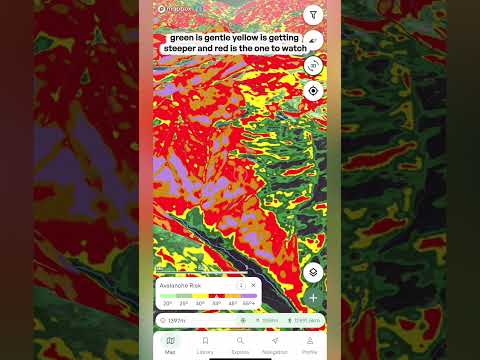
- Open the layers menu Tap the layers button on the map to open the menu, then go to the Terrain tab and tap Avalanche risk. The map is shaded straight away, and a legend card appears at the bottom of the screen. Open the layers menu again and tap Avalanche risk to switch it off.
Reading the colors
- Green and yellow, 20° to 34° Green is gentler ground, below the angles where avalanches usually start. Yellow, from 30°, is getting steeper, and avalanches become possible here when conditions are very unstable.
- Red, 34° to 45° The key band to watch. These are the angles where avalanches most commonly happen, often called prime avalanche terrain. A warning triangle on the legend marks this range.
- Orange and purple, 45° and over Very steep ground, up to the steepest terrain on the map. Snow on slopes this steep tends to shed in smaller slabs and sluffs.
The info icon
- What the colors mean Tap the info icon on the legend card for an explanation of how the layer works, plus a diagram of what happens at each slope angle and a link to an article that goes deeper.
Opacity
- Opacity slider The slider is located at the top of the Terrain layers menu. Drag it down to fade the colors so you can see the satellite imagery or topo map underneath, or up to make the angles stand out.
Important: this layer only highlights the slope angles that avalanches typically form on. Real avalanche danger also depends on the snowpack, the weather and how the slope is triggered. It's for planning only and should never be relied on for critical safety decisions, so use it together with the Avalanche forecast overlay, and always rely on your own training and judgment.