Sometimes you want to mark out a whole zone, not just a line. Plot an area lets you outline it right on the map, then check the weather and daylight for it.
Starting an area
- Plot an area Tap the plus button on the map and choose Plot an area.
Drawing the shape
- Tap to add points Tap the map to drop each corner of your area. The length of each side and the total area in square kilometres update as you go, and the distance around the edge shows in the panel.
- Undo Tap the undo button at the bottom left of the map to take back your last point.
- Color Pick one of seven colors for your area, so different zones are easy to tell apart.
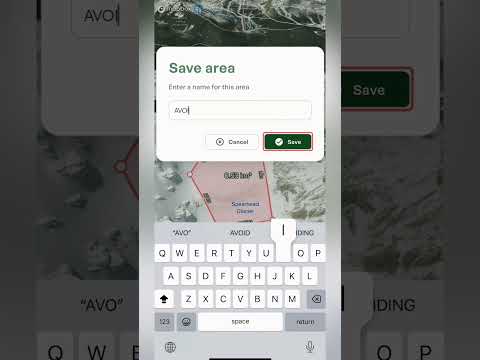
- Save or cancel Save stays greyed out until your points make a shape. Tap Save, give the area a name, and it stays on your map with its name across the middle. Tap Cancel to throw it away.
Once it's saved
Once it's saved, the panel shows the area's name, how many points it has, its size in square kilometres and the distance around the edge. It also has three tabs: Details, Content and Weather.
- Details The local time and timezone, plus sunrise and sunset, first and last light, and the moon.
- Content Change the color, add photos, file the area into one of your lists and write private notes.
- Weather The forecast for the zone, with current conditions and a day-by-day table. Use the range selector to look at the next 24 hours, 3 days, 7 days or 16 days, and the charts underneath cover things like temperature, precipitation, wind, the freezing level, cloud cover and snow depth. Best for: checking what a day in that zone will be like before you commit.
Along the bottom, you can edit the area, orbit around it in 3D, or share it with someone else.
What it's good for
- Zones to avoid Outline somewhere you've decided to stay out of, like a closed area or a spot you've been told to avoid, and give it a color that stands out.
- Zones to ski or climb Mark out the zone you plan to ski or climb, then share it with a friend so you both know exactly where you're headed.
- Measuring See how big a glacier, bowl or basin is, and how far it is around the edge.
- Weather for a zone Get a forecast for the whole zone, hour by hour or day by day, without placing a waypoint or plotting a route.